01
DETECTTechnology detection
Identifies exposed CMSs, JavaScript libraries, frameworks, WordPress components, and selected server or language signals.
PROJECTS / BUILD → BREAK → AUTOMATE
Security tooling, experiments, research utilities, and the things I build when repeating the same manual task starts getting annoying.
VULNWATCH / BROWSER SECURITY TOOLING
TRFFN / VULNWATCH
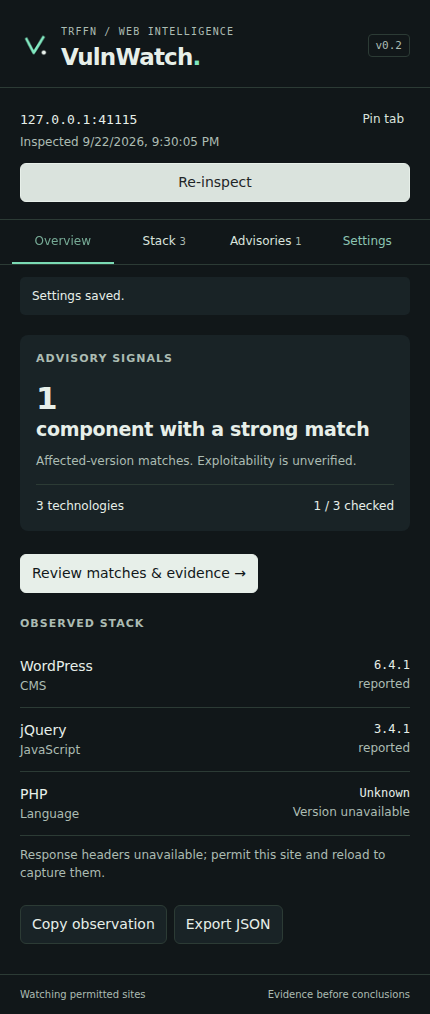
VulnWatch is a Chrome extension for passive technology detection and known-version vulnerability intelligence.
It watches the technical signals a website already exposes, identifies supported technologies and versions, and helps connect those observations to known security advisories.
The goal is not to replace manual research. It removes the boring part: finding a library, copying the version, opening another tab, searching advisories, losing the evidence, and doing it again.
CAPABILITIES / WHAT IT ACTUALLY DOES
VulnWatch separates observations from conclusions. Detection, version evidence, and advisory intelligence remain visible so a researcher can decide what is actually worth investigating.
DETECTIdentifies exposed CMSs, JavaScript libraries, frameworks, WordPress components, and selected server or language signals.
VERSIONShows the runtime value, generator tag, asset path, or response header behind a detected technology and version.
INTELChecks supported package versions against OSV and supports optional GitHub, NVD, WPScan, and ProjectDiscovery integrations.
QUIETStrong affected-version matches can surface as badges while uncertain results stay inside the inspector instead of creating noise.
WORKFLOW / PASSIVE BY DESIGN
No automatic exploitation. No hidden scanner firing requests at the target. VulnWatch starts with evidence already exposed to the browser.
DOM metadata, runtime values, asset paths, and selected response headers.
browser → evidencePreserve the evidence and classify how confident the version observation actually is.
evidence → componentSupported exact package versions can be checked against known advisory sources.
component → advisoryA version match is a lead. Applicability and exploitability still require human validation.
lead → researcherINTELLIGENCE / OPTIONAL PROVIDERS
Core technology detection does not require an account. VulnWatch can use additional vulnerability intelligence providers when the researcher chooses to configure them.
NO KEYOPTIONAL KEYOPTIONAL KEYOPTIONAL KEYOPTIONAL KEYNOTES / READ BEFORE PANICKING
A detected affected version does not automatically prove that the vulnerable function is reachable, exploitable, or eligible for a security report.
VulnWatch is built around passive browser-side observation and read-only vulnerability intelligence lookups.
Detection runs locally. Optional external providers receive only the information required for the lookup being requested.
SOURCE AVAILABLE / BREAK IT RESPONSIBLY